Bakehouse Collect Add it free

Wix App Market · for Wix Stores

Let customers choose when they collect. Then know what to bake.

Bakehouse Collect adds collection times to your Wix checkout, works out what you need to make each morning, and keeps your boxes honest about the stock inside them.

Free to start — and free stays free. Not a seven-day trial.

Your data stays in your own Wix site Two questions to set up No analytics, no trackers, no cookies added
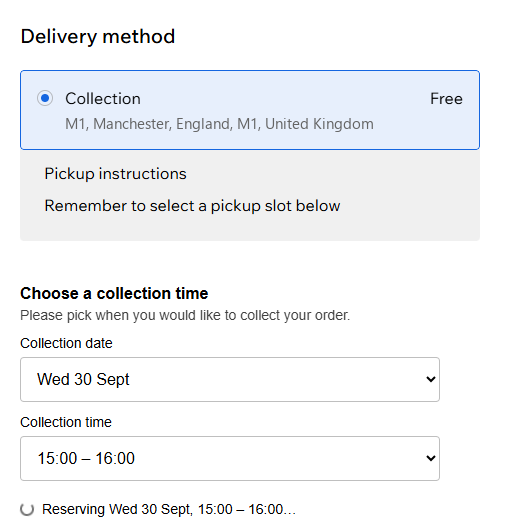
A Wix checkout with Collection chosen as the delivery method, and the collection picker directly beneath it: Wednesday 30 September, 15:00 to 16:00
Your customer picks a day and a time, inside your existing Wix checkout.

The problem

Wix cannot let your customers choose a collection time.

That is not an oversight anybody has hidden — Wix's own help centre says so plainly, on a page where merchants have been voting for it since 2021.

So small food businesses do what they can.

They put a note in the order comments and hope.

They take collection times over Instagram.

They keep a paper diary next to the till and reconcile it on a Sunday.

And on a busy weekend, somebody turns up for a cake nobody has made.

What it does

Nine things, and they all know about each other.

Collection times are what most shops come for. The rest is what stops the week falling over once the orders are actually coming in.

Collection times that match your oven, not just your calendar

Most scheduling tools give you one set of rules for the whole shop. A bakery does not work like that: a decorated cake needs a week's notice, a tray of brownies needs two days, and one rule for both is wrong twice.

So set the days and hours you actually hand orders over, then set rules per range of products:

  • Notice periods per range. Two days for brownies, a week for a decorated cake.
  • Weekly deadlines. “Order by 9pm Thursday for that weekend.”
  • How many collections at once. You cannot hand over twelve boxes in one ten-minute window.
  • How much you can make in a week — counted in bakes, not orders. Forty brownies is forty brownies, whether they leave loose or inside boxes.

A customer with a cake and a box of brownies in the same basket gets the times that suit both. When a week is full, it stops being offered — and the customer is told why, rather than finding an empty calendar.

The day before, they can get a reminder that they have something to collect, sent through your own Wix Automations. A forgotten delivery still turns up on a doorstep; a forgotten collection sits behind the counter until it is thrown away, with the ingredients and the morning already paid for.
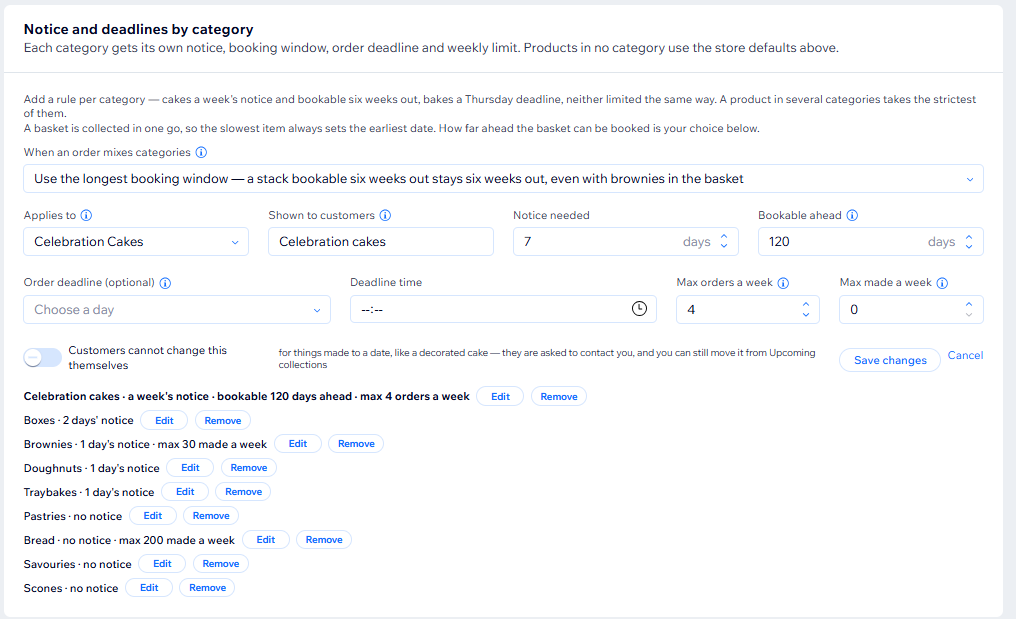
Notice and deadlines by category: Celebration Cakes need 7 days' notice, are bookable 120 days ahead and capped at 4 orders a week, alongside rules for boxes, brownies, bread and six other categories
Different rules for different ranges — because a cake is not a cookie.

Know what to bake before you start

Every morning's orders, broken down into individual bakes — with boxes opened up into what is inside them. Six Weekend Boxes stops being six boxes and becomes thirty-six brownies and twelve blondies.

No counting through order emails. No adding up at 5am.

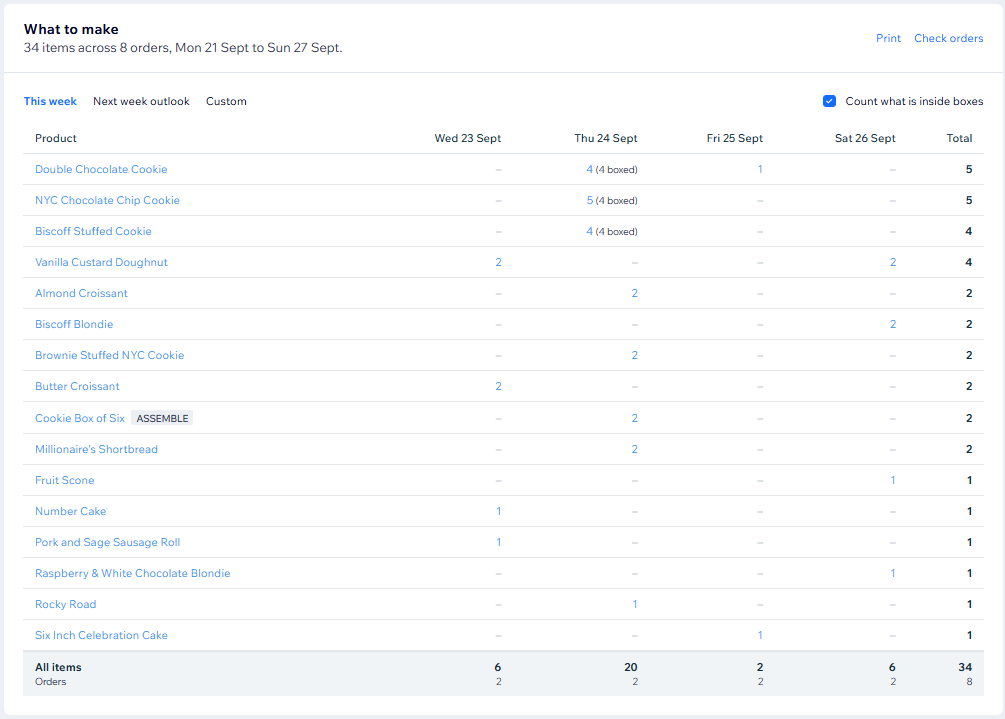
What to make for the week: 34 items across 8 orders, by day, with cookies from boxed orders counted individually and the Cookie Box of Six marked to assemble
Tomorrow's baking, added up for you — including everything hiding inside your boxes.

Then pick it, and pack it

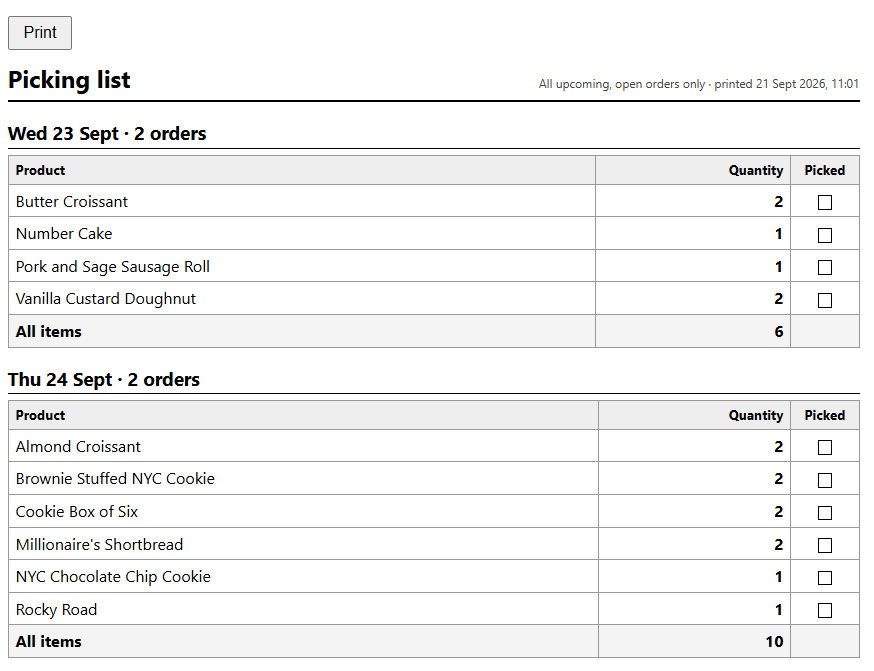
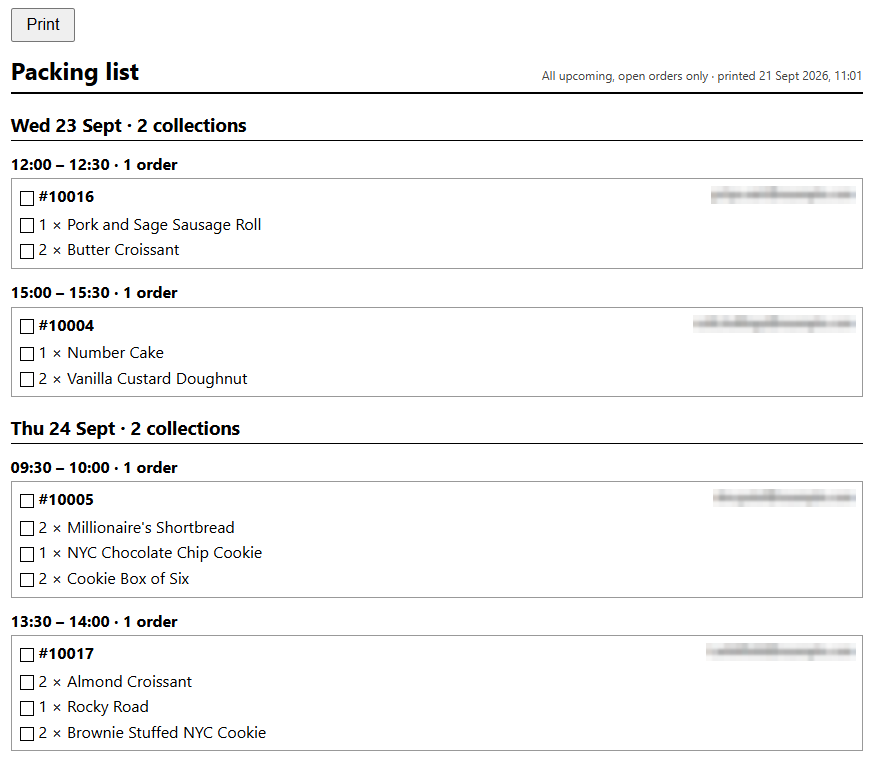
Two sheets to print from Upcoming Collections. The picking list totals each day's products, with a box to tick as each one comes off the rack. The packing list goes order by order, grouped by collection time, so every bag is made up once and checked once.

Nothing left off an order because the list lived in your head.

A printed picking list for Wednesday 23 and Thursday 24 September: each product with its quantity for the day and a Picked tick box A printed packing list grouped by collection time, one box per order with a tick box beside each item
Picking by the day, packing by the order.

Boxes that know what they hold

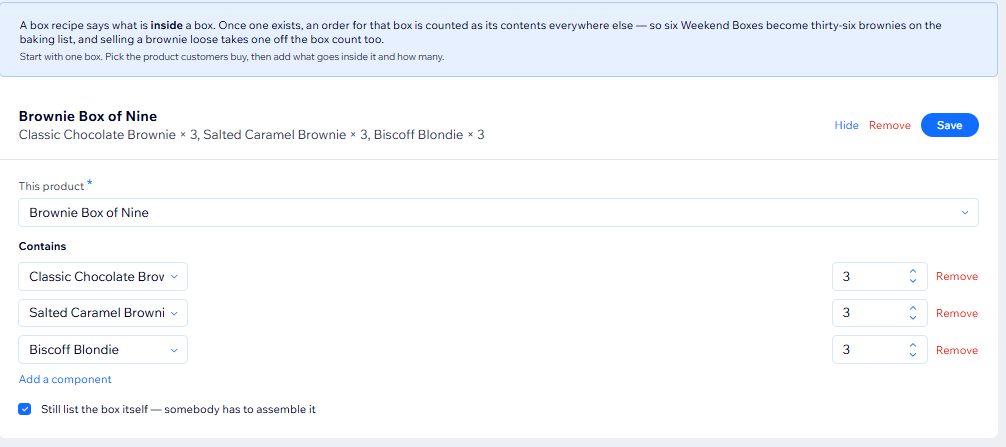
Tell it a Weekend Box is six brownies and two blondies, and the box follows the bakes inside it. Sell six brownies loose and the box count drops too — so you cannot sell the same week's baking twice, once loose and once in a box, and find out on the Friday.

The Brownie Box of Nine recipe: three Classic Chocolate Brownies, three Salted Caramel Brownies and three Biscoff Blondies
Set a box's contents once. Its stock looks after itself.

Let them build the box

A customer picks a box, dresses it with a ribbon or a card, fills it from what you sell and writes a message. It reaches the basket as one line at one price — a box, not a list of twelve things — and they can still open it and change their mind before they pay.

The kitchen sees it the other way round: the twelve bakes inside, on the baking list, on the packing list, and off the shelf. Boxes are counted in units, so a cake can take two places where a bar of chocolate takes one.

Not a bakery? The same builder is sold on its own as Packhouse Build — boxes and hampers without the collection times, the baking lists or the allergen checks, and asking for a good deal less of your shop.

Screenshot 9 — build your own box

The builder on the storefront, part way through: a box chosen, a few bakes added, and the capacity showing what is left to fill.

One line in the basket. Twelve bakes in the kitchen.

What actually sold

A box is one line to Wix: Build your own box — Twelve, £32. True, and no use to anyone deciding how many brownies to make next Saturday, because every report Wix draws is blind to what was inside.

So the app counts it itself. Every box — built by the customer or made from one of your recipes — is opened into what was in it, and counted under its own products and categories, beside everything sold loose and everything rung up at the counter. The box's money goes to the things that earned it, and the ribbon takes none of it.

Screenshot 10 — what sold

The What Sold tab over a week or a month, showing units by product with a box opened into its contents, and the split by source.

Units by product, with the boxes opened up.

A counter till that does not ask silly questions

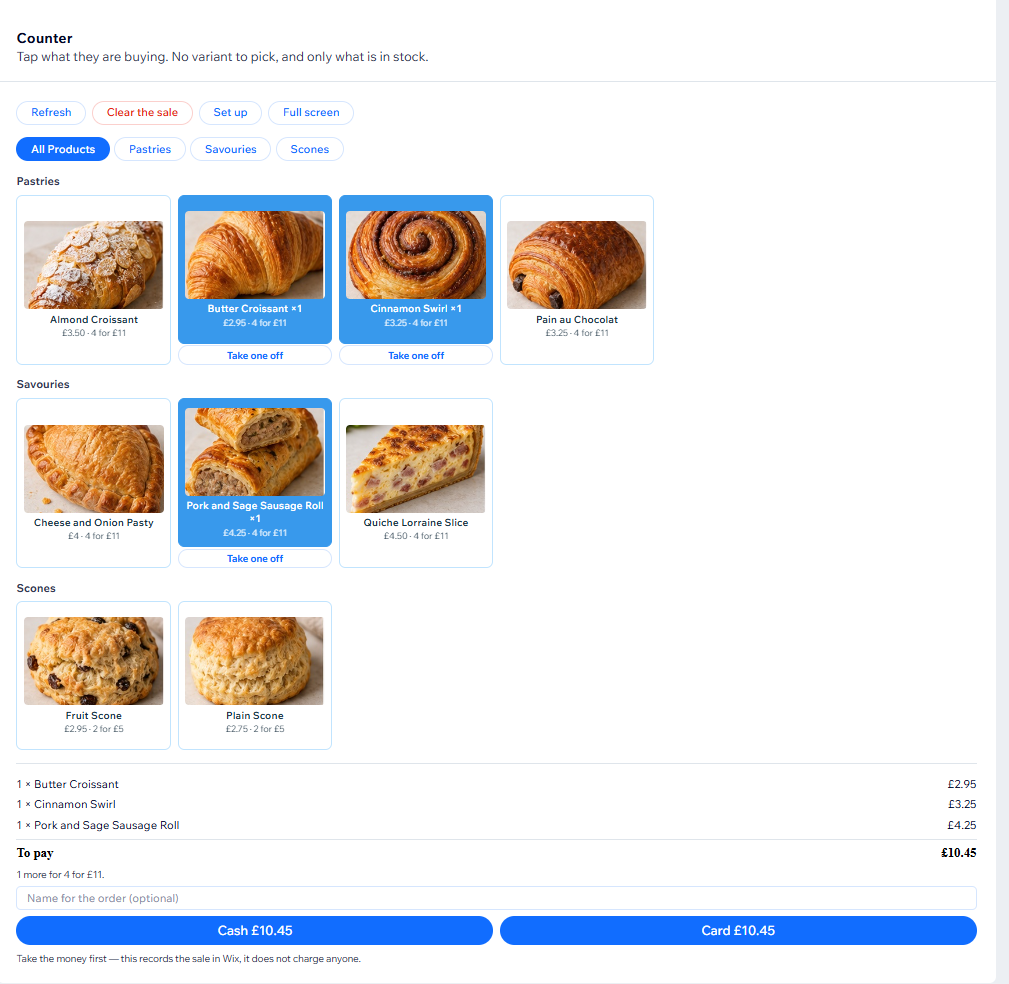
Big buttons, one per thing you actually have in stock, grouped the way your counter is. One tap per item. Your own quantity offers are applied automatically, and the sale is recorded in Wix as a real order — so your stock and your reporting stay right whether someone buys online or at the counter.

No picking a variant when there is only one. No re-entering what you just sold.

The counter till with product photos: Butter Croissant, Cinnamon Swirl and a Pork and Sage Sausage Roll tapped, the basket totalling £10.45, a prompt that one more makes 4 for £11, and buttons to record the sale as cash or card
Tap what they are buying. Offers applied, sale recorded, stock updated.

Allergens, cross-checked and ready to show

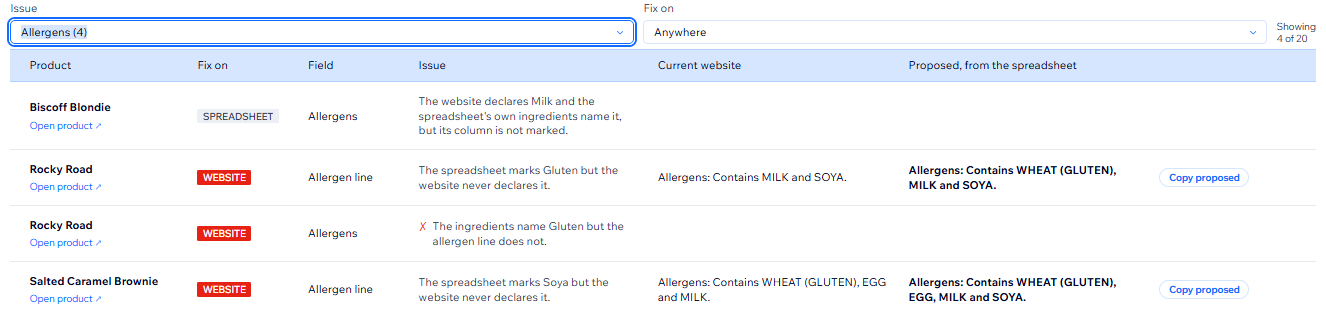
Upload your allergen spreadsheet once. Bakehouse Collect then checks every product page against it — which allergens are declared, whether the ingredients agree, and what is on one list and not the other.

Nobody enters allergen data at a sensible hour. It gets done at midnight, after the baking, in the same sitting as the invoices — and that is exactly where a line slides one column across and nobody sees it for a month. The check is the second pair of eyes you do not have at midnight.

It cannot tell you what is in your food. Only you know that. What it can do is find the place where you already knew, and the website never said so.

Then export the lot as a single page: every product, all fourteen allergens, the ingredients, and anything that still needs looking at.

Products & Allergens findings for allergens: on Rocky Road, the spreadsheet marks Gluten but the website never declares it, with the current allergen line and a proposed one, Allergens: Contains WHEAT (GLUTEN), MILK and SOYA, ready to copy
It finds where your spreadsheet and your product pages disagree.

Where to find us

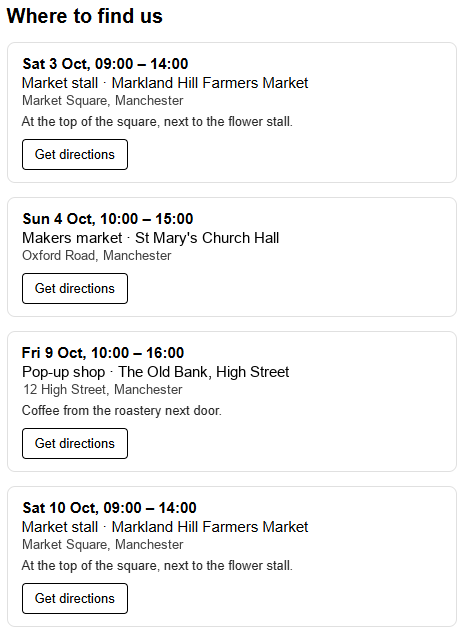
Selling at markets and pop-ups? Put your dates and locations on your own site, kept in one place, with a map link for each.

Weekly, fortnightly, first Saturday of the month — the repeat patterns are built in, so a stall you do every month is one entry, not twelve.

The Where to find us list on a shop's own website: four upcoming dates, each with the event, the venue, its address and a Get directions button
Your next few markets, on your own site.

On the paid plan

Two quiet nudges on your storefront.

Both use the offers you already set up in Wix. Neither ever names a price your own checkout will not honour.

Closer to a better price

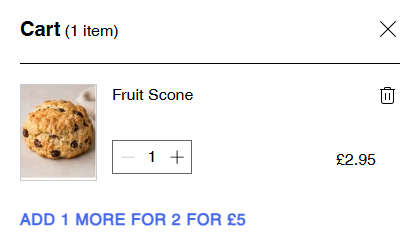
In the cart, where acting on it is a tap away: “Add 1 more for 2 for £5.” It counts the whole basket rather than the product on screen, names the easiest break rather than the biggest saving, and stays quiet when there is nothing useful to say.

A side cart holding one Fruit Scone, with “Add 1 more for 2 for £5” beneath it
One scone in the cart, and the offer is one more away.

This goes well with that

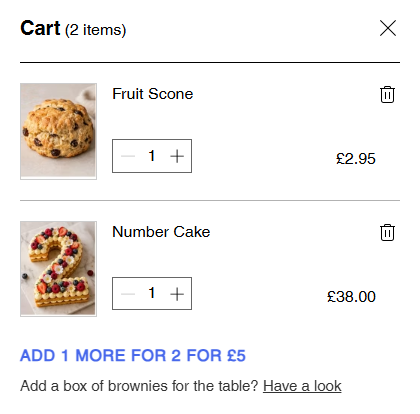
You write the wording, because only you know your coffee goes with your brownies. The app picks the moment — when the basket has one thing but not the other — and shows one suggestion, never three.

A side cart holding a Fruit Scone and a Number Cake, with “Add 1 more for 2 for £5” and beneath it “Add a box of brownies for the table? Have a look”
A cake in the basket and no brownies, so it suggests some.

What it costs

Collection times are free. Permanently.

Free

£0 / month

Not a trial. It does not expire.

  • Collection times at checkout
  • Booking up to 7 days ahead
  • Opening hours, slot length, collections per slot
  • One notice period and one weekly deadline, shop-wide
  • Closed dates and holidays, unlimited
  • Customers change their own time
  • The collections diary
  • Market stalls and pop-ups
  • Retention, erasure, automations and export
See the full list
Paid

£19.97 / month

billed yearly · or £24.93 month to month
Prices as the Wix App Market shows them in pounds. Wix sets them from our US dollar price at its own exchange rate, so they can move; what you pay is the price Wix shows when you subscribe.

14-day free trial, cancel any time before it ends. Paying yearly saves £59.52 a year.

  • Everything free, plus:
  • Book as far ahead as you like
  • Notice periods and deadlines per category
  • Weekly caps on orders and on bakes
  • What to make each morning
  • Box recipes, and box stock that follows them
  • The counter till
  • Allergen and product checks
  • Offers and cross-sell on your storefront
See the full list

Prices are in US dollars because that is what the Wix App Market charges in; the sterling figures are approximate and move with the rate. The free plan is not a trial and does not expire — it runs this week's collections and shows the whole app working on your own products. Its one real limit is the seven-day booking window: a shop taking weekend orders never meets it, and a celebration cake meets it on the first order.

Nothing set up on free is lost. Category lead times and weekly caps can be typed in and left sitting there; upgrading switches them on rather than asking you to start again. Downgrading takes the features away and keeps the data. Every feature, and which plan it sits on →

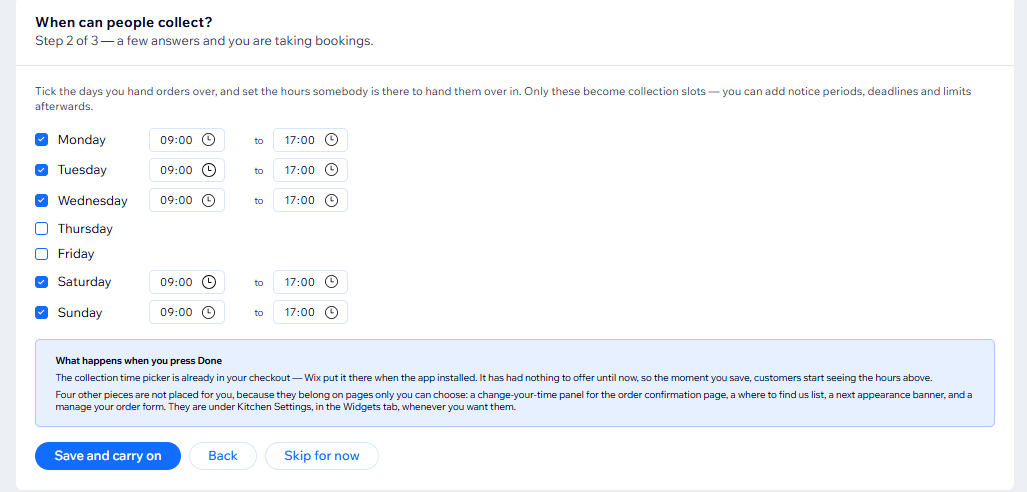
Setup wizard, step 2 of 3: collection days ticked with hours of 9:00 to 17:00, and a note that customers see those hours as soon as it is saved
A few answers and you are taking bookings.

Requirements

What your site needs.

Wix Stores

A Wix site with Wix Stores installed. The app reads your products, categories, orders and discount rules from it.

Either catalogue

Works with Wix Stores on the current catalogue and on the older one. Product groups need the current one, because Wix only offers them there.

Wix CMS

Installed on the site before the app. Its settings and bookings live in ordinary collections on your own site.

Before you ask

The questions that come up first.

Where does my data live?

In your own Wix site, in ordinary CMS collections you can open and export. We do not receive it and cannot browse it. The app adds no analytics, no trackers and no cookies to your storefront. See the privacy policy for the three narrow exceptions, all of which are stated there plainly.

Does the counter till take card payments?

No. It records the sale in Wix as a real order and marks payment as taken offline, so your stock and reporting stay right — but it never sees or handles card details. Take the payment however you take it today.

What happens to the paid features if I stop paying?

Collection times, your hours, your rules and your capacity limits keep working — that is the free plan, and it is not a trial. The production lists, box recipes, counter till, product checks and storefront offers stop. Nothing is deleted.

Can I move a collection after the order is placed?

Yes, and the booking is what the app works from, so your collection list is always right. One thing worth knowing: Wix does not allow an order's custom fields to be rewritten after the fact, so the order itself and the customer's original confirmation email keep the time they chose. A note is added to the order's timeline recording the change — but if you move a collection on someone's behalf, you still need to tell them.

Why do the rules use categories rather than tags?

Because Wix Stores creates every product tag as private, and no app can read them — a tag-scoped rule would match nothing and say nothing about it. A category works, and needs no upkeep: adding a product to the range is a drag rather than a rule edit. The category can be hidden from your site and still works perfectly.

How much setup is there really?

The wizard asks two questions — where your shop is, so the times are in its timezone, and which days and hours you hand orders over. That is enough to start taking bookings. The lead times, deadlines and capacity caps are there when you want them, and everything you do not configure keeps a sensible default.

Then check the collection picker has appeared in your checkout. If it has not, placing it is one button in the app's dashboard, then publish your site. The support page walks through it.

Why it exists

Built in a working bakery, for the weekend that got out of hand.

Bakehouse Collect started as one bakery's answer to taking collection orders through a website that would not take them. Everything in it exists because a Saturday went wrong first.

Contact

Ask us anything.

A question before you install, a problem after, or something it does not do yet that you need. It reaches a person.

We use what you send here only to answer you. See the privacy policy.